How to Connect Website Visitor Identification to Your Ad Platforms (2026)
How growth marketers connect website visitor identification to Google, Meta, and LinkedIn ads: the three jobs the connection does, what to report back, and how to fit a long B2B sales cycle inside Google's conversion windows.
By Imran Patel, Co-founder and CEO, Syft DataUpdated 8 min read
Your ad platform learns from one thing: the conversions you report. Tell Google that every form-fill counts as a win, and its bidding will hunt for the cheapest people willing to type an email into a box. In B2B, those people are often researchers, job seekers and freebie collectors, and your dashboard will celebrate them with a cost per lead that keeps falling.
Website visitor identification gives you a better thing to report. It names the companies behind your paid clicks, tells you which of them fit your ICP, and shows which went on to do something your sales team respects. Report that, and the platform starts learning what a buyer looks like.
This guide is for growth marketers who own a paid budget and have to defend it. It covers the three jobs the connection does, what to report, how to handle Google's conversion windows on a long sales cycle, and where Syfty (formerly Syft Data) stands on each piece today.
Key takeaways
- Bidding chases whatever you call a conversion. Call a form-fill a conversion and you buy more form-fills.
- Identification turns each paid click into a company you can score, which gives you a sharper conversion to report.
- The connection does three jobs: show which accounts each campaign brought, report qualified conversions back, and keep fit accounts that still need time in a retargeting audience.
- Since June 15, 2026, Google routes new offline conversion setups through the Data Manager API, so build any new loop there.
Can visitor identification software connect to ad platforms?
Most tools connect in some form, so the useful question becomes which way the data flows. A tool that only pulls ad data into a dashboard gives you a nicer report. A tool that also pushes qualified accounts back gives the platform a better target.
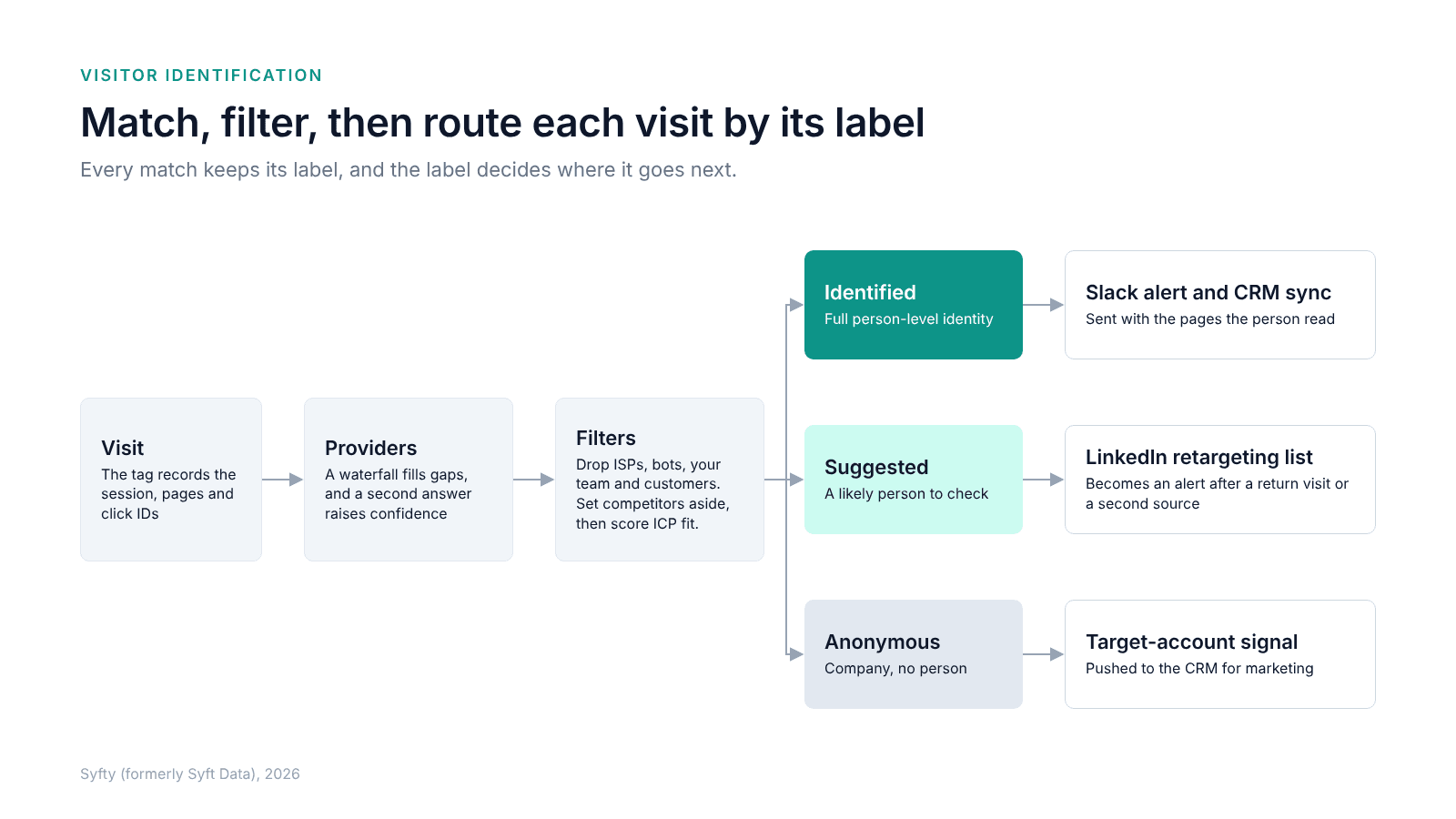
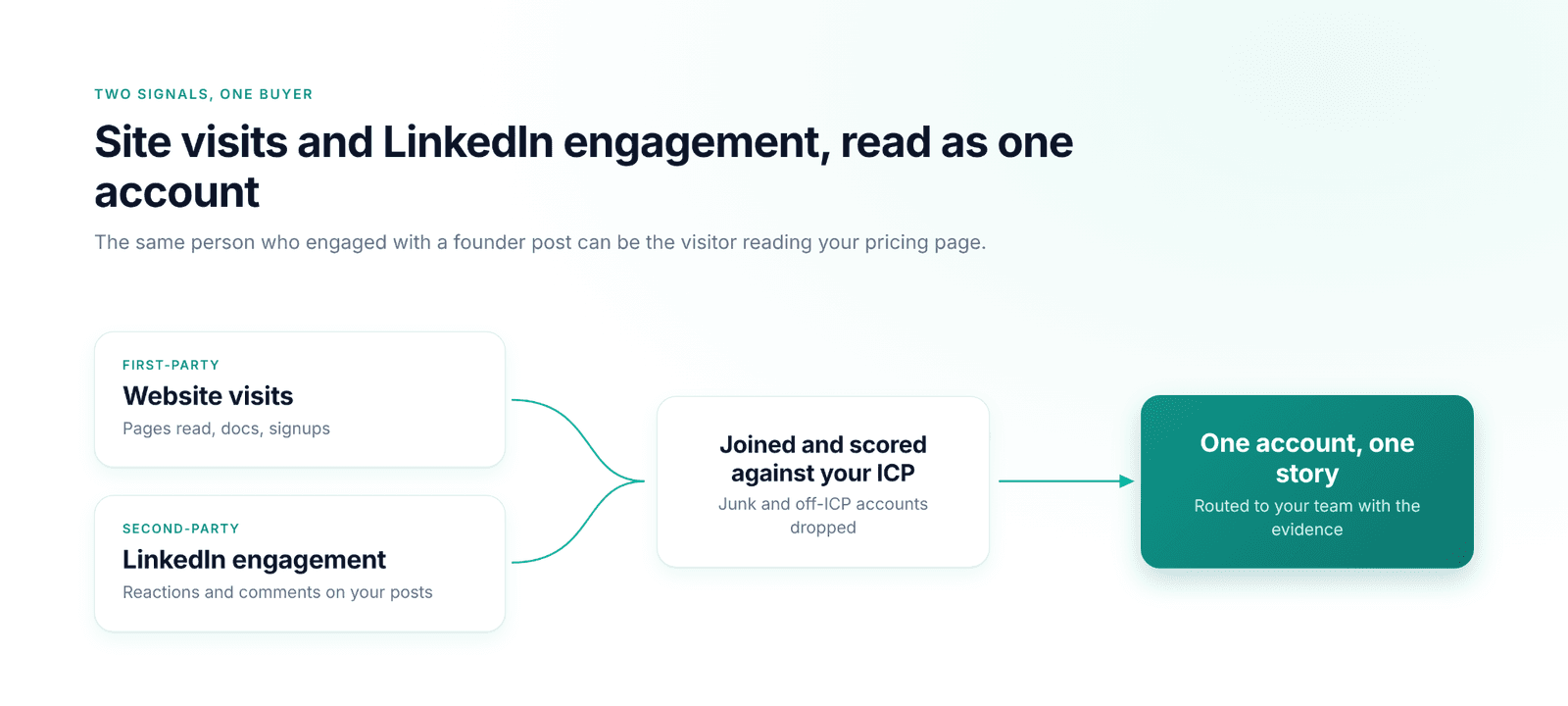
Three jobs sit inside that connection: reading which companies each campaign brought, reporting the fit ones back as conversions, and holding the fit accounts that need more time in a retargeting audience. Each needs its own plumbing, and the value builds when all three run together.
Why your ad platform keeps finding junk
Smart Bidding sets each bid by predicting how likely a click is to convert, and it learns that prediction from the conversions you report. It has no view of lead quality unless you give it one. Report every form-fill as a win, and it will find you more of them, cheaper each month, whether anyone in them could buy or nobody could.
Form-fills make a weak proxy in B2B, since the people most willing to trade an email for a PDF are often the furthest from a purchase, and optimizing hard toward them grows the share of budget they take.
Think about the model the platform builds from your data: a short list of real buyers teaches it a narrow profile it can go and find again, while everyone who ever submitted a form teaches it a crowd with no shape.
Step 1: See which companies each campaign brought
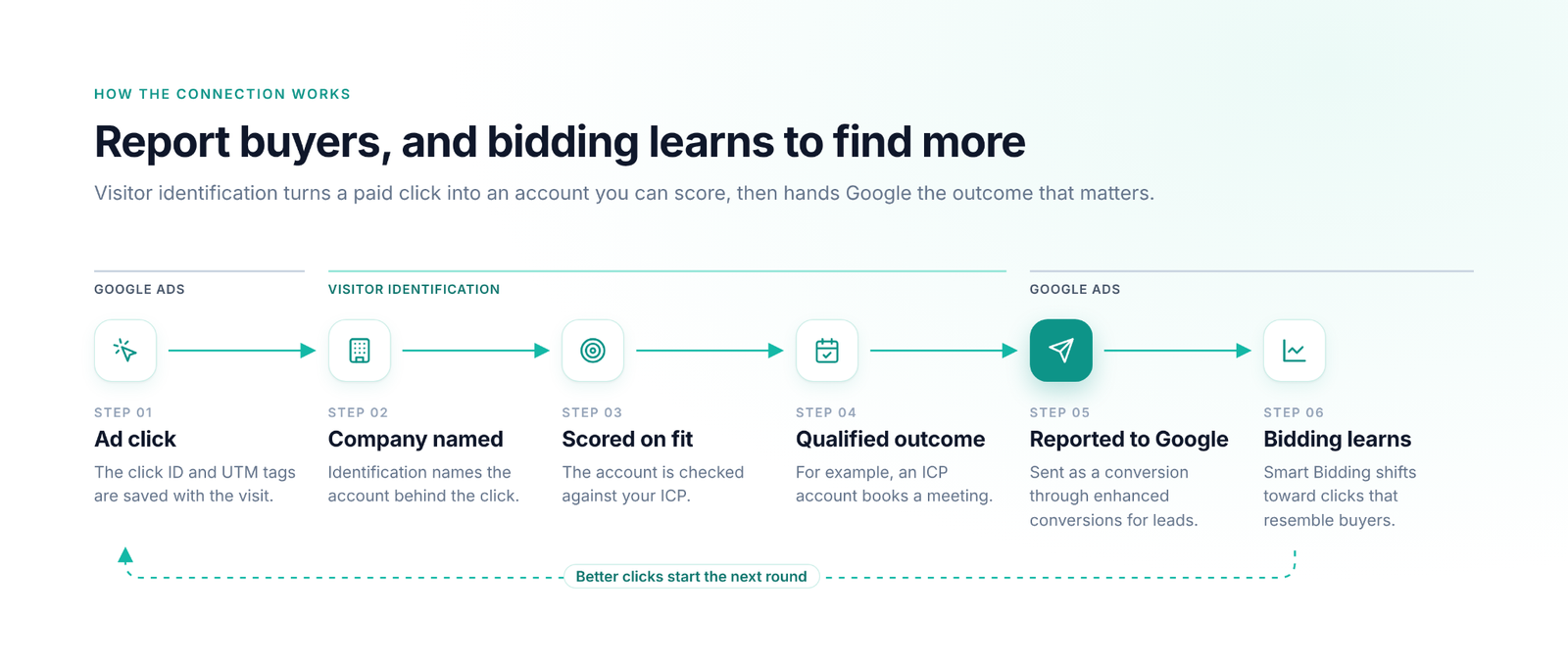
Start with the account view of your paid traffic. When someone lands from an ad, the URL carries a click identifier, a GCLID from Google or your UTM tags, and you store it with that visit. Identification then names the company behind the visit, which lets you read every campaign as a list of accounts.
That view changes budget decisions on its own. A campaign with an ugly cost per lead can turn out to bring the accounts your sales team wants, while a cheap one brings nobody worth a call.
Run a weekly review that sorts campaigns, keywords, and audiences by fit accounts. You move budget yourself, on evidence about who showed up, before a single conversion goes back to Google.
Step 2: Report qualified conversions back to Google
This step changes what the algorithm learns. Once you know which accounts fit and moved, you report that outcome to Google as the conversion, and bidding starts aiming at accounts like them.
Google recommends enhanced conversions for leads for this. It upgrades offline conversion import by adding hashed first-party data, such as the email from a form, alongside the click ID, which gives Google a second way to tie the outcome back to the right click.
The plumbing changed this year, because starting June 15, 2026, Google stopped accepting new offline conversion setups through the Google Ads API and made the Data Manager API the main route. If you are building the loop now, build it on the Data Manager API, or use a tool that already does.
Report on a steady cadence, daily or weekly. A platform that hears about outcomes every few days keeps adjusting; one that hears once a quarter has nothing to adjust to.
What counts as a qualified conversion
Decide what you will report before you connect anything. A qualified conversion is an account that fits your ICP and did something your sales team counts: booked a meeting, reached a product milestone, or moved to a pipeline stage.
A booked meeting with an ICP account makes a good first choice. Sales already trusts it, and it usually happens early enough for the platform to learn from it.
Start with the earliest outcome you trust. As deals advance, report a second, higher-value conversion for the later stage, which keeps the platform learning while the account matures.
The B2B timing problem
Google credits a conversion to a click only if it lands inside the conversion window. That window is 30 days unless you change it, and you can stretch it to 90 days at most. A deal that closes in month five falls outside it.
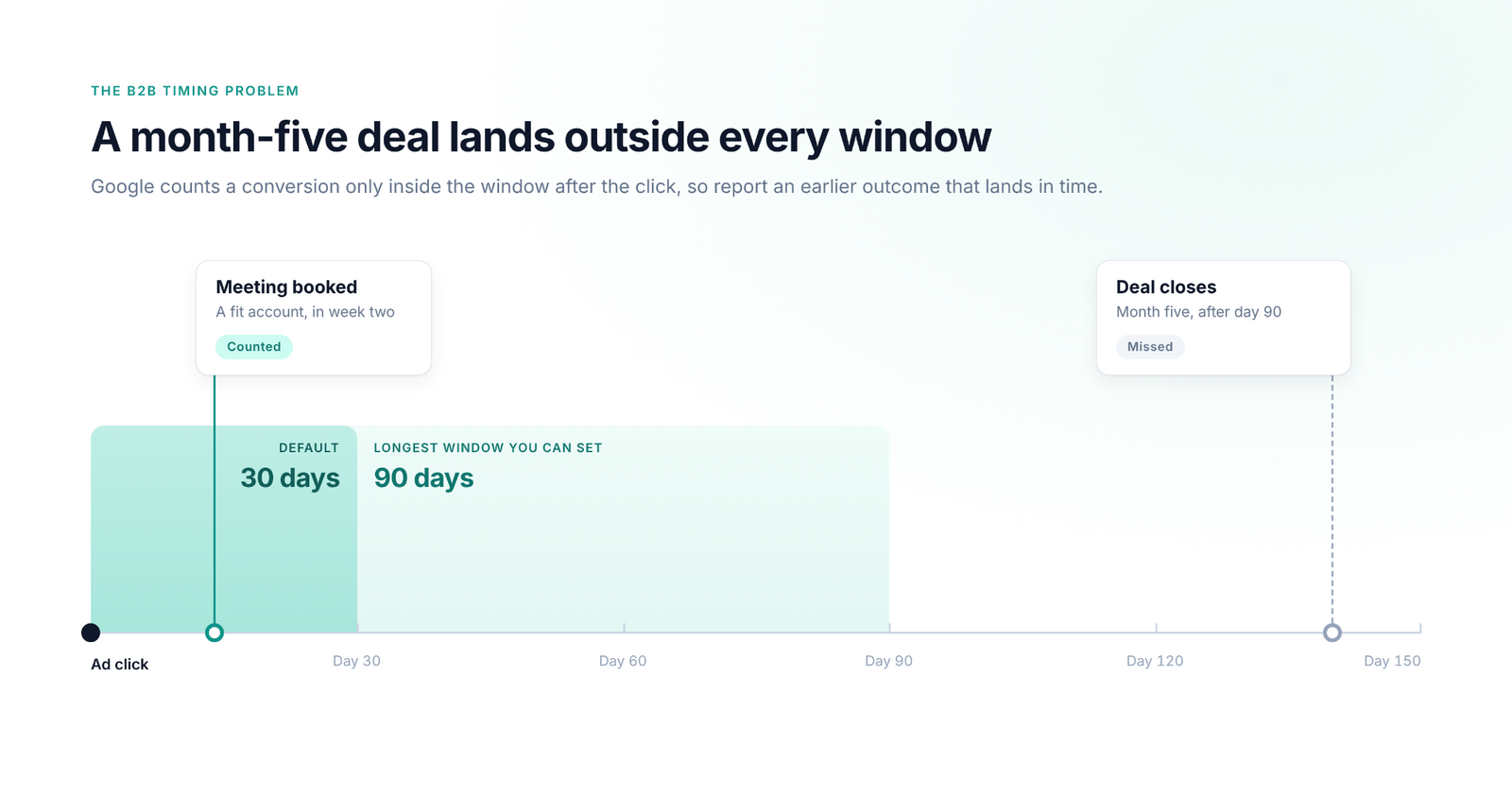
Wait for closed-won, and the platform hears almost nothing about your best campaigns. It then learns from the one signal that arrives on time, which is the form-fill.
The fix is to report a true, earlier outcome inside the window, a fit account booking a meeting in week two, for example, and add later stages as they happen. You give the platform accurate information while it can still use it.
Step 3: Retarget the fit accounts
Most fit accounts that click your ads will buy in a later quarter, if they buy at all. Keeping them in an audience means your next ads reach people who already know you.
LinkedIn makes this cleanest, because its Matched Audiences can target a list of companies. Google and Meta build audiences from people: Google's Customer Match and Meta's Custom Audiences match the contact details you upload, which means account-level targeting there depends on how many contacts you can resolve and match.
Matched lists also go stale as people change jobs. Refresh them on a schedule, monthly at least.
Expect direction, and build from there
You will tie some clicks to an account and miss others, because some visitors browse from home networks, some block tracking, and every match carries some error.
This job can live with that error, because you need the direction of your demand, and a signal about buyers with some noise in it still teaches the platform more about who to find than a clean count of form-fills. Start with what you can match today and widen it as your data improves.
What Tonic changed
Tonic.ai, one of our customers, spent across many marketing sources and struggled to tell quickly which ones reached its audience. Once the team could see the companies behind that traffic, one expensive newsletter sold as a developer channel turned out to send mostly sales, marketing, and partnership people, around 70% of its visitors, and Tonic stopped putting money into it.
The case study reports wasted ad spend down 27% alongside a 400% ROI, which Tonic counts as four dollars of pipeline for every dollar spent. Those results are Tonic's own, and the part you can copy is the habit underneath them: check who a channel brings before you give it more budget.
Paid traffic is one part of the wider work of turning anonymous traffic into pipeline, which covers what happens to the visitors your ads never touched.
What to do this week
- Check that every ad landing page captures the click ID and UTM tags and stores them with the visit.
- Turn on account identification, so next week's campaign review reads in companies.
- Pick one qualified outcome, such as a booked meeting with an ICP account, and report it to Google through enhanced conversions for leads.
- Build one LinkedIn audience from fit accounts that visited and have yet to convert.
Where Syfty fits
Syfty covers this loop, at different stages of readiness:
| The job | What it does | Where Syfty is today |
|---|---|---|
| Account view of paid traffic | Names the company behind each paid click, from click IDs and UTMs | Live |
| Qualified conversions to Google | Reports fit accounts as the conversion, so bidding learns from buyers | Early access |
| Account-level audiences | Keeps fit accounts that have yet to convert in front of your ads | LinkedIn today; Google and Meta on the roadmap |
It scores every identified account against your ICP before anything reaches your reports or your audiences. LinkedIn ads intent sits on the Pro plan at $500 a month, listed on our pricing page, and you can start without a card.
If your paid reporting still stops at cost per lead, see which companies your campaigns bring with Syfty.
FAQ
Can visitor identification software connect to Google Ads?
Yes, and the connection worth having reports qualified accounts back to Google as conversions, through enhanced conversions for leads, which gives Smart Bidding a buyer to learn from. Ask any vendor whether they send that signal back or only read campaign data in.
Does this work with Meta?
Meta's Conversions API accepts server-side conversion events you can optimize toward, and the same principle applies. Meta audiences match people from the contact details you upload, which makes account-level targeting there looser than on LinkedIn.
Will this improve my ROAS?
It changes what your bidding optimizes toward, which is the lever behind spend efficiency, but any number a vendor quotes you belongs to another account, Tonic's included.
How long before performance changes?
Plan for weeks, because B2B conversion volumes are small and the platform needs a steady run of qualified conversions before its model shifts. Switching bid strategies every week restarts that learning.